

Tapas – Comics and Novels
Tapas Entertainment Inc.
I spent time with Tapas as a mobile reading app for comics and webnovels, and my first impression was that it is built for people who want a steady stream of serialized stories rather than a single finished book. The experience feels closer to browsing a large digital shelf that is refreshed episode by episode than opening a traditional comic reader. That difference matters: Tapas is easy to dip into during a break, but it also asks you to make choices about accounts, purchases, notifications, and how much of your reading life you want tied to one service.
The app is free to install, and Tapas Entertainment Inc. is the developer behind it. It sits in the Comics category, carries a Teen content rating, and has grown to over 10 million installs. Those figures suggest that it is not a niche experiment, but popularity alone is not a reason to trust an app with personal information or spending. I looked at the service from that more practical angle: what the app lets me control, where I need to slow down, and whether its reading model suits the way I actually consume stories.
What the reading experience feels like in everyday use
Tapas works best when I treat it as a discovery tool. Instead of deciding on one known title and leaving, I can browse different comic and novel series, sample a premise, and decide whether the pacing is worth following. That makes it useful for a short commute, a lunch break, or the few minutes before bed when I want something lighter than a full-length book. The format also encourages returning regularly, because serialized stories are designed to be read in portions rather than finished in one sitting.
My favorite practical workflow is to browse when I have time, start only a small number of series, and keep the rest as possibilities rather than immediately committing to everything that looks appealing. This prevents the reading list from becoming a noisy collection of half-started stories. It also helps me notice whether a series has the kind of update rhythm and episode length that fits my routine. A dramatic comic that works in short bursts is a different choice from a novel that needs longer, quieter sessions.
The app is particularly approachable for readers who enjoy discovering independent-feeling web storytelling and who do not mind reading in installments. Someone who wants a complete graphic novel, a carefully curated library, or a distraction-free ebook shelf may find the experience less satisfying. Traditional ebook apps usually put the book itself at the center, while Tapas puts discovery, ongoing series, and the next episode much closer to the surface.
Related News

Instagram Is No Longer a Photo App. It Is an Attention Engine

Microsoft Teams Mobile: When Collaboration Becomes Navigation

How the NFL App Adapts to Android and iOS Updates

Temu: Elevate Your Shopping Experience to Billionaire Status

Why Traffic Rider Works Best as a Precision Reflex Game

How Google’s Find Hub Transforms Everyday Searches
Why the format is convenient, and where it can interrupt reading
Short episodes make Tapas easy to fit around real life. I can read a little without needing to remember a complicated plot structure, especially with a comic that communicates quickly through panels. Webnovels offer a different kind of commitment: they can provide more room for character development, but they also make it easier to lose track of a long-running story if I take a break.
The trade-off is that serialized reading can make the app feel less like a private library and more like a continuing feed. I have to be comfortable stopping at an episode boundary, waiting for the next part, or deciding whether I want to continue paying attention to a title over time. Readers who dislike cliffhangers or prefer to control the entire pace of a story will probably be happier with downloaded books or completed collections elsewhere.
The current version is 7.11.2, and it supports devices running Android 7.0 or later. That makes the app accessible to many older Android users, although compatibility is not the same as a guarantee of a perfect experience on every phone. On a smaller display, comic lettering can become the deciding factor. I would test a sample episode before settling into a long series, particularly if I read on an older or compact device.
Gallery
Accounts, purchases, and the moments that deserve attention
Tapas is free at the starting point, but it includes in-app purchases ranging from $0.99 to $99.99 per item. That range is important because a casual reader and a highly engaged reader can approach the service very differently. I would not treat the free installation as the full financial picture. Before buying anything, I would check the item price, understand what it unlocks, and decide whether I am paying for one immediate reading choice or building a habit of repeated spending.
My strongest advice is to add a pause between wanting an episode and confirming a purchase. Serialized stories are deliberately good at creating curiosity, and that is exactly when a reader can make a quick decision without considering the total cost. I prefer setting a personal monthly limit outside the app, keeping purchase authentication active on the device, and reviewing the transaction screen rather than tapping through automatically. These are simple controls, but they preserve a useful moment of choice.
For families, the Teen rating should be taken seriously. It does not tell me that every title will suit every younger reader, so I would not hand over the phone and assume the rating settles the question. I would preview the kinds of stories being opened, discuss purchases, and use the device’s own account or purchase restrictions where appropriate. The app can be a good shared discovery space, but it should not replace ordinary supervision.
Trust also depends on what I can see and manage around my account. I look for clear sign-in choices, readable purchase confirmations, and settings that let me decide how much contact I want from the service. If an app encourages an account, I want to know what benefit I receive from creating one before I provide more information than necessary. I also prefer to keep my reading identity separate from unrelated accounts when the available sign-in choices allow that.
How I think about privacy and data-sensitive moments
I do not infer privacy quality from a polished interface or a large user base. With Tapas, the moments that deserve the most attention are account creation, payment, notifications, and any request for access that is not obviously connected to reading. I would review the permission prompts on my own device and decline anything that does not make sense for the way I plan to use the app. A comic reader needs a clear reason before I allow access beyond what I consider necessary for reading and account management.
Payment is another point where I become more deliberate. I prefer using the platform’s established purchase confirmation process rather than treating an in-app offer as an impulse button. I would also check which account is connected to the transaction, especially on a shared device. That small step can prevent the wrong person from being charged or from assuming that a purchase belongs to a different profile.
Notifications can be useful for a serialized service, but they can also turn reading into a constant prompt. I would allow only the alerts that genuinely help me, such as reminders I actively want, and turn off the rest through the app or the operating system. This is not just about convenience. Reducing unnecessary prompts gives me more control over when I return, instead of letting the service decide the rhythm of my attention.
I also avoid treating a reading history as meaningless. The titles I open can reveal interests, moods, and habits, even when there is no payment involved. I would think carefully before using a shared profile, and I would review the account controls available to me if I ever stop using the app. The practical rule is simple: keep only the account connection I need, check visible settings periodically, and do not assume that deleting the app automatically answers every account question.
Where Tapas gives me agency, and where I still need discipline
The best kind of control in Tapas is the ability to decide what I read and when I spend. I can approach it as a sampler, follow only stories that earn my time, and stop when a series no longer works for me. That sounds obvious, but it is valuable in a catalog built around ongoing discovery. I do not need to turn every appealing cover into a long-term commitment.
At the same time, the service’s structure places responsibility on me. I need to distinguish between a title that is genuinely enjoyable and one that is merely easy to keep opening. I also need to remember that a free first step can lead to paid reading later. My preferred approach is to read enough of a series to judge its tone and pacing, then decide whether it deserves money. I would rather support a small number of stories intentionally than make many minor purchases that add up unnoticed.
One useful habit is to separate “save for later” from “read now.” When I find an interesting title, I make a note of why it caught my attention instead of opening every episode immediately. Later, I can return with a clearer idea of whether I want comedy, romance, fantasy, or a novel. This reduces aimless scrolling and makes the app feel more like a personal reading queue than an endless storefront.
Another is to use a stopping rule. For example, I might read a few free episodes, evaluate the writing and artwork, and then wait before unlocking anything. If I still want to continue after a day or two, the decision is more considered. This is especially helpful with cliffhanger-heavy series, where the emotional urge to see the next scene can be stronger than the actual value of the purchase.
I would also keep expectations realistic about continuity. A webcomic or webnovel may be enjoyable precisely because it unfolds gradually, but that means the experience is not entirely under my control. If I need a story for a flight, a holiday, or a long offline period, I would choose a service designed around complete downloads and predictable access instead. Tapas is better for ongoing discovery than for guaranteeing that one specific story will serve as a self-contained travel library.
Who should use it, and who should choose another reading app
I would recommend Tapas to readers who like trying new comics, enjoy webnovels, and are happy with episode-based storytelling. It is a strong match for someone who wants a broad mobile catalog and does not mind deciding title by title whether to keep reading. It also suits people who like having a few different moods available: a quick comic for a short break and a longer novel for a more focused session.
I would be more cautious recommending it to someone who wants a one-time purchase with no ongoing temptation, a strictly curated collection, or a completely finished story. A conventional ebook store may be better for readers who want ownership-like access to complete books. A dedicated comic reader may be preferable for people who already have their own files or who care more about page layout than discovery. Tapas is not a universal replacement for those tools; it has a particular strength in serialized browsing.
Parents should make their own decision based on the individual reader, not just the Teen label. The rating is a useful starting signal, but it is not a substitute for checking themes, discussing spending, and setting device-level controls. Likewise, privacy-conscious readers should inspect the permission and account choices on their own phone before settling in. I value the ability to make those decisions myself, but I do not assume that every setting will be ideal by default.
My measured conclusion after using the app
Tapas is a capable comics and webnovel app with a clear identity: it is built around finding and following serialized stories, not simply storing completed books. I enjoyed the low barrier to sampling and the way short episodes fit into ordinary spare time. The free entry point makes exploration easy, while the wide purchase range means I would use a budget and a deliberate confirmation habit before unlocking regularly.
Its trust profile, in my view, depends less on its popularity than on my own visible choices. I would review permissions, limit notifications, keep payment confirmation meaningful, and think about what an account and reading history reveal. Those steps do not turn the app into something it is not; they simply make the experience more intentional.
With an average rating of 4.2 from over 124 thousand ratings and around 14 thousand written reviews, the reception is broadly positive, though I would still treat those numbers as context rather than proof that every title or device experience will suit me. The app is free to start, but the best value comes when I choose stories carefully instead of following every prompt.
My cautious verdict is that Tapas is worth trying if serialized comics and webnovels genuinely match your reading habits. I would recommend it to a curious reader who wants discovery and accepts the responsibilities of a catalog with optional purchases. I would skip it in favor of a traditional ebook or comic library if my priority were completed books, strict spending boundaries, or a quieter reading environment. Used with those expectations, it can be an enjoyable reading companion without asking me to surrender control of every decision.
FAQs for Tapas – Comics and Novels
What is Tapas, and what content does it offer?
Tapas is a digital platform that provides a wide range of comics and novels. It caters to diverse genres, from fantasy and romance to horror and science fiction. Users can explore thousands of stories created by independent authors and artists, making it a vibrant community for both readers and creators.
Is Tapas free to use, or are there any costs involved?
Tapas offers both free and premium content. While many comics and novels are accessible for free, others require Tapas Coins to unlock. Coins can be earned through in-app activities or purchased. This model supports creators, allowing them to monetize their work while providing readers with a flexible experience.
How user-friendly is the Tapas app for new users?
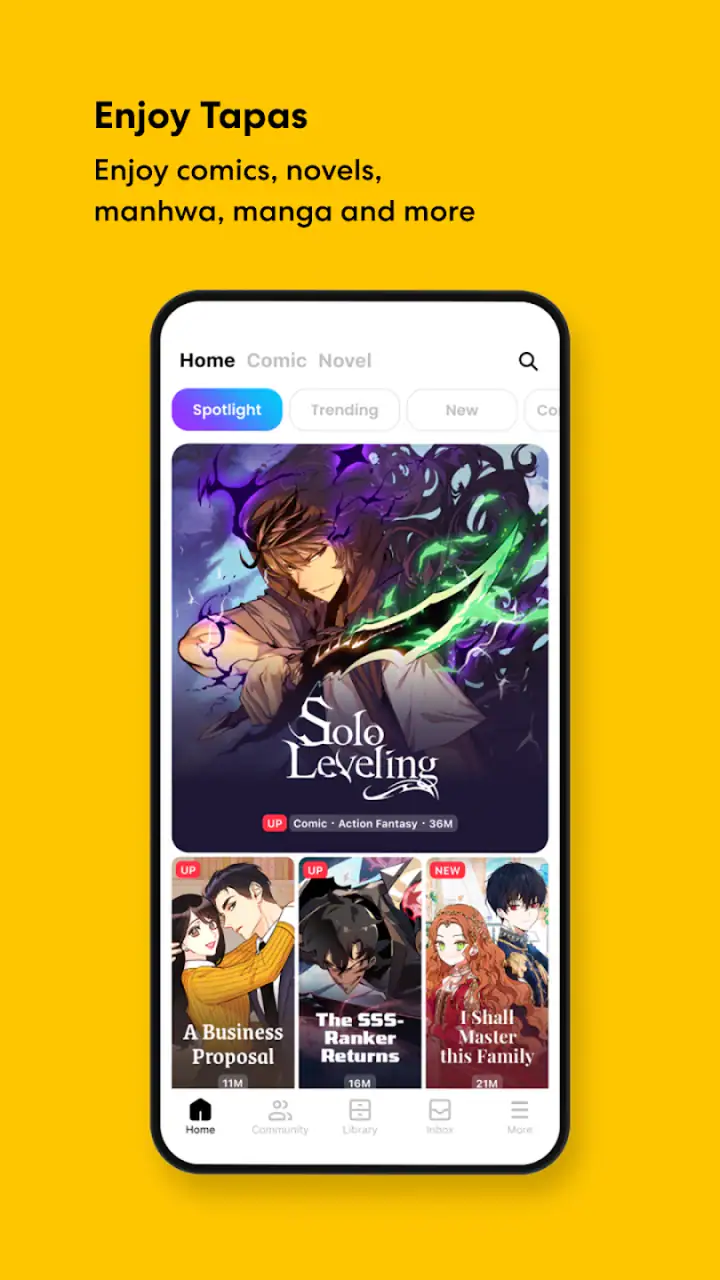
The Tapas app is designed with a user-friendly interface, making it easy for new users to navigate. The home page highlights trending and recommended stories, while intuitive search and filter options help users find specific content. Additionally, the app provides personalized recommendations based on reading history, enhancing user experience.
Can I create and publish my own content on Tapas?
Yes, Tapas allows users to publish their own comics and novels. It provides tools and resources for creators to reach a wide audience. By joining the Tapas Creator Community, you can share your stories, receive feedback, and potentially earn revenue through the platform's monetization options.
Is Tapas available on both Android and iOS devices?
Tapas is available for download on both Android and iOS devices, ensuring accessibility for a broad audience. The app is regularly updated to improve performance and add features, providing a seamless experience across different devices. Users can enjoy their favorite stories anytime, anywhere with just a few taps.
Pros
- Vast library of unique comics and novels.
- User-friendly interface for easy navigation.
- Offline reading for premium content.
- Regular updates with new content.
- Interactive community for readers and creators.
Cons
- Limited free content compared to premium.
- In-app purchases can be pricey.
- Ads interrupt reading experience.
- No option for custom notifications.
- Some genres have limited selection.


